
stickmanfigth
Here goes a Stickmanfight Module
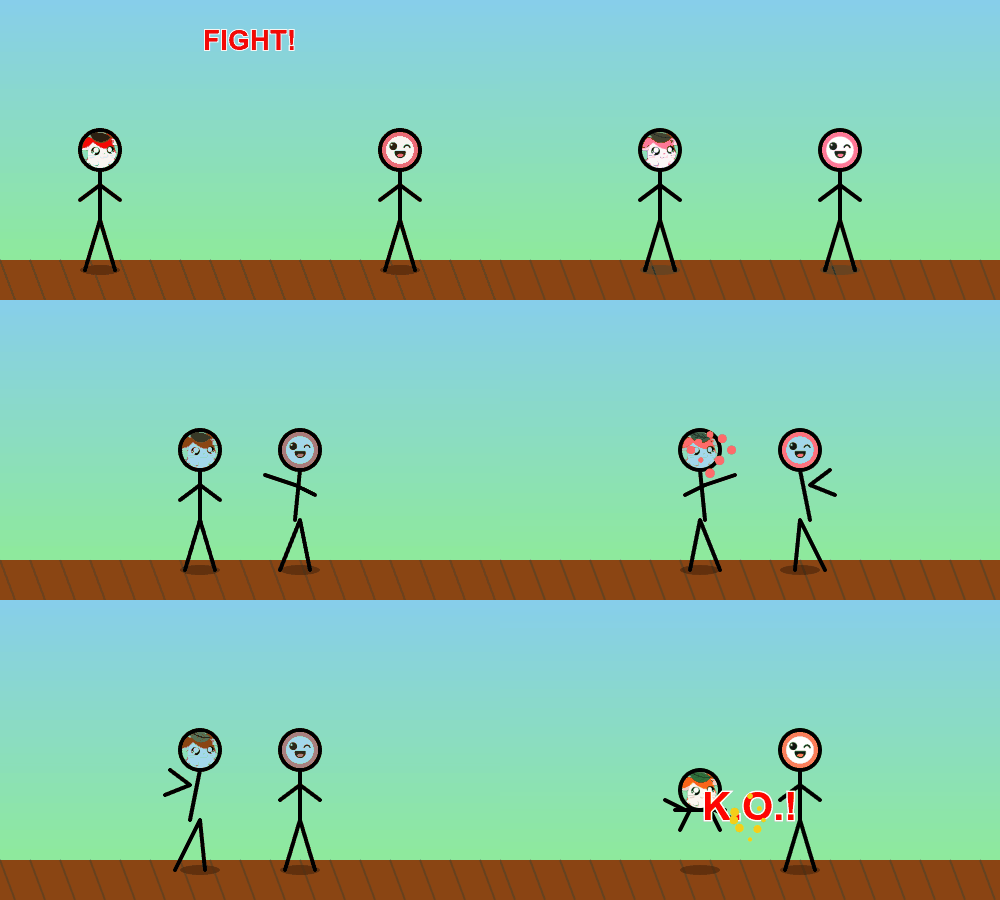
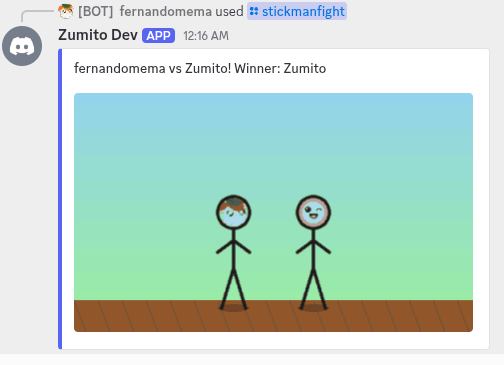
The Stickmanfight module is an interactive Discord bot command that creates animated stick figure fight GIFs between Discord users. This module uses canvas rendering to generate custom animated battles with user avatars as heads for the stick figures.
Features
- Animated GIF Generation: Creates custom animated stick figure battles using HTML5 Canvas
- User Avatar Integration: Uses Discord user avatars as heads on the stick figures
- Random or Targeted Battles: Fight against a specific user or let the bot pick a random opponent
- Dynamic Backgrounds: Renders scenic backgrounds with ground, sky, and clouds
- Particle Effects: Includes sparkle effects for dramatic K.O. moments
- Multi-language Support: Built-in translation system for different languages
- Configurable Embed Colors: Customizable embed colors for different bot themes
Showcase
Installation
This module is part of the Zumito ecosystem and requires both zumito-framework and @zumito-team/canvas-module.
npm install @zumito-team/stickmanfight-module @zumito-team/canvas-module
Usage
Integrate the Stickmanfight module into your Zumito bot zumito.config.ts:
import path from 'path';
import { ServiceContainer, type LauncherConfig } from 'zumito-framework';

const __dirname = process.cwd();

export const config: LauncherConfig = {
    bundles: [{
        path: path.join(__dirname, "node_modules", "@zumito-team", "canvas-module"),
    }, {
        path: path.join(__dirname, "node_modules", "@zumito-team", "stickmanfight-module"),
    }],
};
Command Usage
Users can invoke the stickmanfight command in several ways:
/stickmanfight
/stickmanfight @user
/stickmanfight @user1 @user2
- No arguments: Random battle between the command user and another random member
- One user: Battle between the command user and the specified user
- Two users: Battle between the two specified users
Technical Details
Animation System
The module creates a multi-frame GIF animation featuring:
- Canvas Size: 500x300 pixels
- Frame Rate: 10 FPS with 100ms delay
- Animation Frames: Progressive stick figure battle sequence
- K.O. Effect: Special effects when the battle concludes
Rendering Features
- Background: Gradient sky from light blue to green
- Stick Figures: Animated with user avatars (64x64px) as heads
- Physics: Simulated movement and combat animations
- Particles: Golden sparkle effects during victory moments
Configuration Options
interface StickmanfightModuleConfig {
    embedColor?: number; // Hex color for Discord embeds (default: 0x5865f2)
}
File Structure
stickmanfight/
├── index.ts                    # Module entry point
├── commands/
│   └── Stickmanfight.ts       # Main command implementation
├── config/
│   └── StickmanfightConfig.ts # Configuration management
└── translations/
    └── command/
        └── stickmanfight/
            ├── en.json        # English translations
            └── es.json        # Spanish translations
Dependencies
- zumito-framework: Core bot framework
- @zumito-team/canvas-module: Canvas rendering utilities
- discord.js: Discord API integration
- canvas: Node.js canvas implementation
- gifencoder: GIF generation library
Translation Support
The module includes built-in translations for:
- English (
en.json) - Spanish (
es.json)
Translation keys include battle result messages and command descriptions.
Command Implementation
The Stickmanfight command class extends the base Command class and implements:
- Argument parsing: Handles optional user parameters
- Member validation: Ensures sufficient server members for battles
- Canvas rendering: Creates animated stick figure scenes
- GIF encoding: Outputs final animated result
- Embed generation: Formatted Discord embed with battle results
Example Output
When executed, the command generates:
- An animated GIF showing two stick figures (with user avatars) in combat
- A Discord embed announcing the winner
- Particle effects and "K.O." text for dramatic effect
Performance Considerations
- Memory Usage: Canvas operations are memory-intensive
- Processing Time: GIF generation may take 2-5 seconds
- File Size: Generated GIFs are typically 200-500KB
- Rate Limiting: Consider implementing cooldowns for heavy usage
Contribution
To extend this module:
- Add new animation sequences in the canvas rendering loop
- Implement additional background themes
- Add more particle effects or visual enhancements
- Extend translation support for additional languages
License
This project is licensed under the GNU General Public License (GPL).
Perfect for: Entertainment bots, gaming communities, interactive Discord servers looking to add fun visual commands that engage users with personalized animated content.
- PriceFree
- Installs0
